Make buttons easier to see on your iPhone
If you’ve recently updated your iPhone, you may have noticed the new controversial Liquid Glass user interface. If you, like many people, find this difficult to read, there are Accessibility settings that can help that were released today.
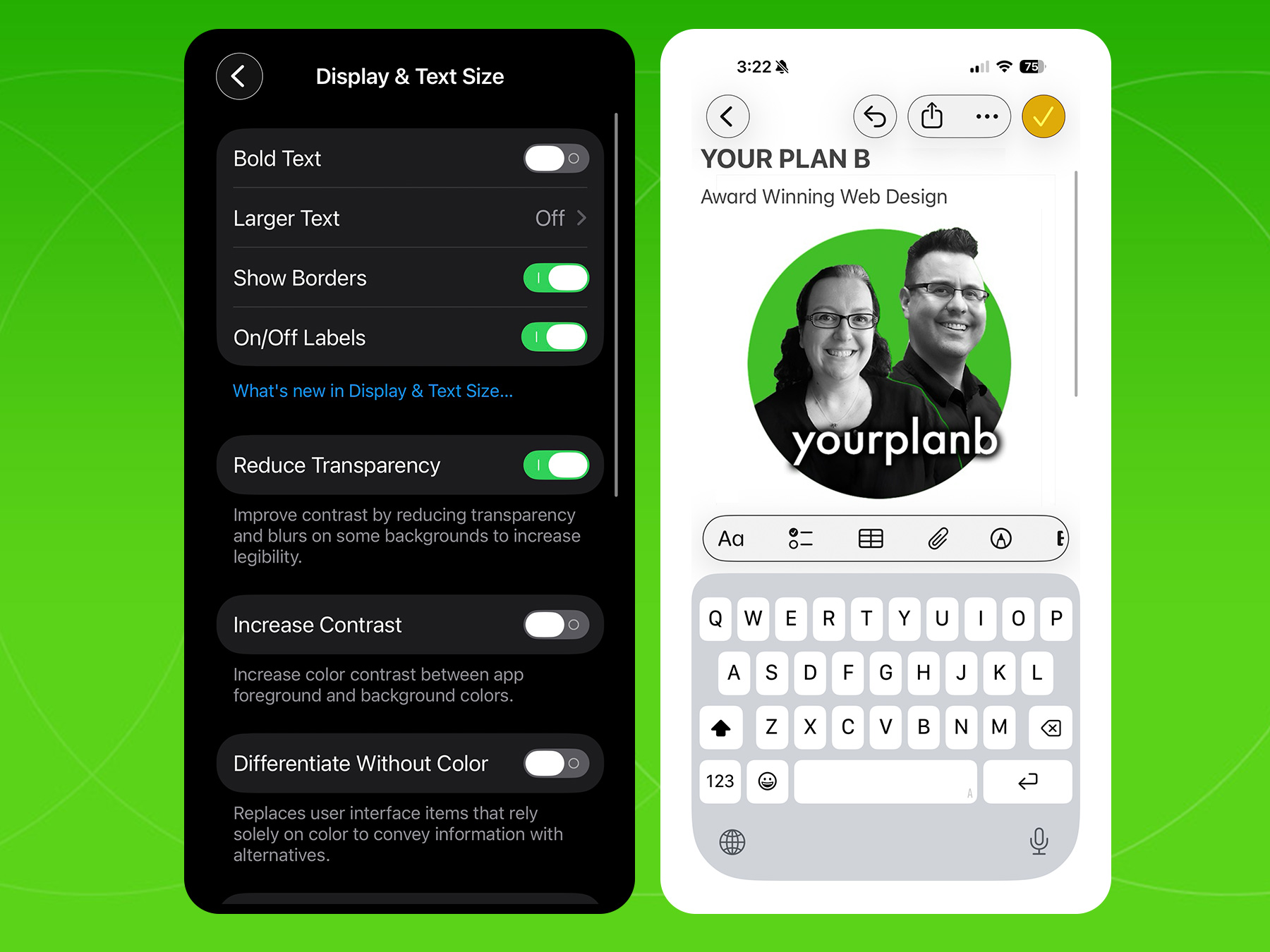
General > Accessibility > Display & Text Size >
- Show Borders
- Reduce Transparency
Here you can turn on Reduce Transparency to improve readability.
And with today’s 26.1 update, you can take it one step further and turn on Show Borders to add an easy to see circle border around all the forward and back arrows, buttons, control panels etc. While a small change, this is a great usability feature not only for those with a visual impairment, but also as a general usability enhancement to the user interface.
The Increase Contrast option can also help, but might feel a little too drastic for some. Visit the Apple website to see all the updates with iOS 26, and especially 26.1
Hope this quick tip helps make using your phone just that little bit more stress free. Like a simple and easy to use layout on a website, good User Experience design is key to making your site easier to use with simplicity, consistency, and accessibility.